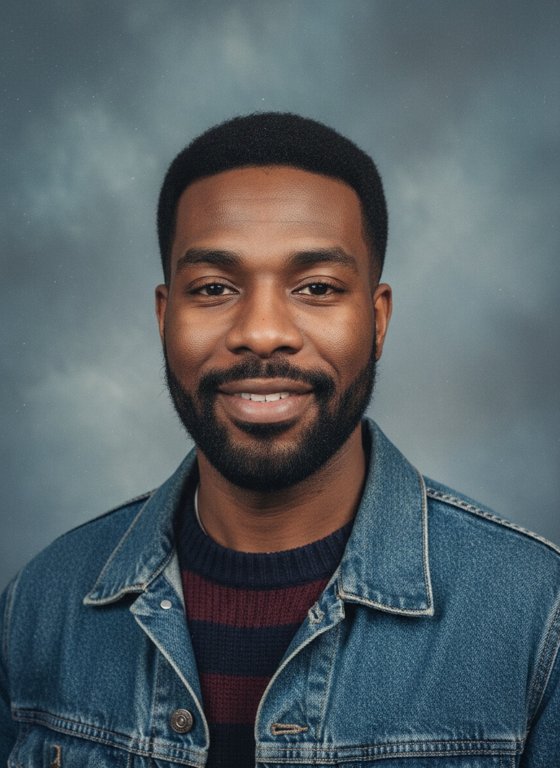
 Example · AI-generated face
More examples
Tap one to see it bigger. Every photo is new, so yours will look different.
90s Yearbook
Get your 1990s yearbook portrait.
How it works
About 90s Yearbook
90s Yearbook gives you a 1990s school portrait at your current age: mottled blue-grey backdrop, soft studio flash, 90s hair and clothes and faded print colours.
It’s a quick way to see how you’d have looked in a yearbook from that decade.
Photo tips
- A head-and-shoulders photo looking at the camera matches the yearbook framing best.
- Even light on your face keeps the result looking like you.
- One person per photo.
Ideas for posting
- Caption it “most likely to…” and let friends finish the line.
- Post it with a 90s song for a throwback.
Questions
Does it make me look younger?
No. It keeps your current age and changes the backdrop, hair, clothes and photo style.
Is it a photo or a video?
A photo (JPEG) you can download and share.
Is it really free?
New accounts get 10 free credits: a photo uses 1. Free results are watermarked. After that, credits come in plans and packs on the Pricing page.
What happens to my photo?
It’s stored privately in your own folder and used only to make your photo. We delete it as soon as your photo is ready (or within 2 days if it isn’t made: the clean-up runs daily). Videos and photos we make are kept for 7 days so you can download them.
Which photos work best?
One person, face clearly visible, good light. No one under 18.
More trends

10 free credits · Add your photo, then sign in