How to do the AI Christmas photo trend
By Make Trending · · Updated
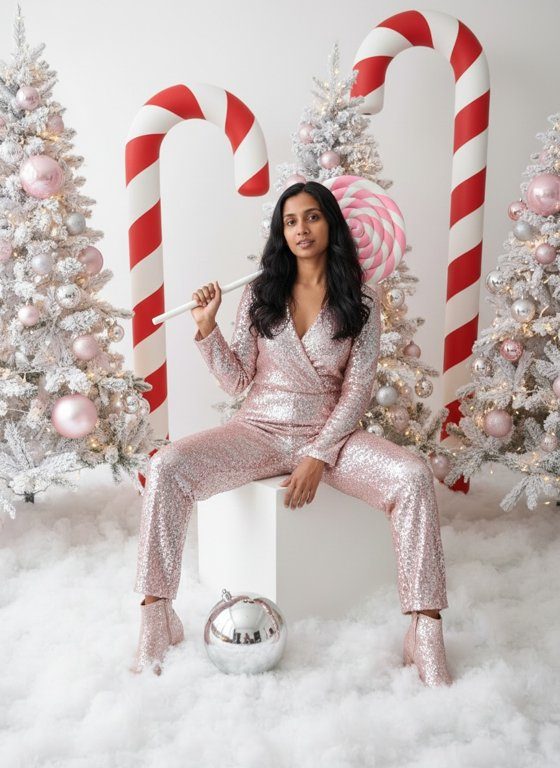 Example · AI-generated face
More examples
Tap one to see it bigger. Every photo is new, so yours will look different.
The AI Christmas photo trend turns an ordinary selfie into a glam Christmas studio shoot, with no studio, no props and no sequin outfit of your own.
You don’t write a prompt: add one photo and get the finished picture.
See the Christmas Photoshoot trendWhat is the AI Christmas photo trend?
Every December, people post AI-made Christmas portraits of themselves: glam candy-cane studio shoots with sequins and giant peppermint props (the big look of December 2025), people inside snow globes, and scenes full of baubles and fairy lights. They use them as Christmas cards, profile pictures and December posts.
We have two versions. Christmas Photoshoot is the candy cane glam shoot, full length on a white cube. Snow Globe puts you, full length, inside a glass snow globe with a tiny pine tree and a cottage.
How to make it, step by step
What you get
- A sparkly sequin outfit in white, silver or soft pink
- A giant pink-and-white peppermint lollipop over your shoulder
- Seated on a white cube among giant candy canes and frosted trees
- Fluffy snow, fairy lights and big shiny baubles
- Your face, hairstyle and skin tone kept recognisable
- A portrait photo (3:4 JPEG) you can download and share
- Usually ready in under a minute
- 1 credit per photo; free results carry a visible watermark
Tips for the best result
- Use a clear, front-facing photo: the portrait’s face comes from it.
- Any outfit is fine: the sequin outfit replaces it.
- Skip sunglasses and heavy filters.
- For the snow globe, pick a photo where your face is easy to see: you’re small inside the globe.
Ideas for posting
- Use it on your Christmas card.
- Make it your profile picture for December.
- Post the studio photo and the snow globe together as a carousel.
Questions
Do I need a prompt?
No. The recipe is already written and was tested on eight different faces, so you only add your photo.
Is there a snow globe version?
Yes: the Snow Globe trend puts you inside a glass snow globe. It works the same way, from one photo.
Can I add text, like “Merry Christmas”?
Not yet: the photo has no text. Add it in your phone’s photo editor or when you post.
Is it really free?
New accounts get 10 free credits: a photo uses 1. Free results are watermarked. After that, credits come in plans and packs on the Pricing page.
What happens to my photo?
It’s stored privately and used only to make your photo. We delete it from our servers as soon as your photo is ready (or within 2 days if it isn’t made). The photo is kept for 7 days so you can download it. We don’t use your photos to train AI models.
Which photos are blocked?
Photos without a clear face, of anyone under 18 or of famous people, and photos with nudity or violence. A blocked photo uses no credits.
Sources
- The Tab, 22 December 2025: Here’s how to do that AI Christmas photo trend with the candy canes, using ChatGPT
More guides
10 free credits · Add your photo, then sign in