How to do the “I’m so sorry” AI trend
By Make Trending · · Updated
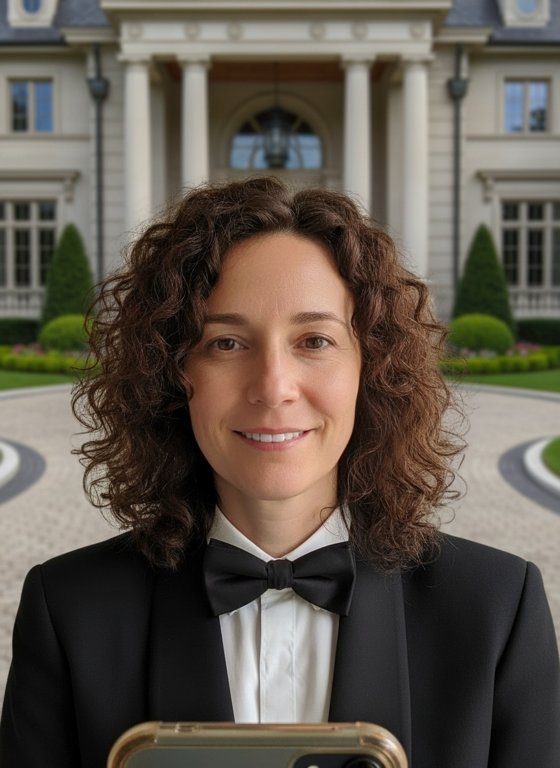 Example · AI-generated face
More examples
Tap one to see it bigger. Every photo is new, so yours will look different.
The “I’m so sorry” trend starts with an impossibly glamorous photo of you and ends with the real one. The joke is the gap between them.
Done by hand, it takes one image-editing prompt per slide. Here you add one photo and get the over-edited first slide; your real photo goes after it.
See the I'm So Sorry Glow-Up trendWhat is the “I’m so sorry” trend?
It’s a TikTok photo carousel, also shared as Instagram Reels. The first slide shows an impressive, heavily AI-edited version of someone; each slide after it admits one edit; and the last slide reveals the real photo with the caption “I’m so sorry”. Kapwing described it in a guide on 29 October 2026.
Ours makes the first slide only: the very same photo of you, same pose and same hair, over-edited with a tuxedo, flawless skin, bright white teeth and a mansion behind you. The trend needs your real photo after it, as the “I’m so sorry” reveal.
How to make it, step by step
What you get
- The same pose, angle, crop and expression as your photo
- Your own hair, exactly as it is
- A sharp black tuxedo with a bow tie
- Flawless, glowing skin and bright white teeth
- A huge mansion entrance behind you instead of your room
- A portrait photo (3:4 JPEG) you can download and share
- Usually ready in under a minute
- 1 credit per photo; free results carry a visible watermark
Tips for the best result
- Use an everyday photo, not your best one: the bigger the gap, the funnier the reveal.
- A front-facing photo keeps the glow-up looking like you.
- Save your original photo for the last slide.
- One person per photo.
Ideas for posting
- Glow-up first, real photo last, captioned “I’m so sorry”.
- Add a slide for each “edit” in between, such as “the tuxedo”, “the skin”, “the house”.
- Do one for a friend, with their permission, and let them post the reveal.
Questions
Does it make the whole trend?
No. It makes the first slide; the trend needs your real photo after it in TikTok or Instagram.
Can I choose the outfit or the place?
Not yet: every one has a tuxedo and a mansion.
Is it really free?
New accounts get 10 free credits: a photo uses 1. Free results are watermarked. After that, credits come in plans and packs on the Pricing page.
What happens to my photo?
It’s stored privately and used only to make your photo. We delete it from our servers as soon as your photo is ready (or within 2 days if it isn’t made). The photo is kept for 7 days so you can download it. We don’t use your photos to train AI models.
Which photos are blocked?
Photos without a clear face, of anyone under 18 or of famous people, and photos with nudity or violence. A blocked photo uses no credits.
Sources
- Kapwing, 29 October 2026: How to Do the "I'm So Sorry" AI TikTok Trend
More guides
10 free credits · Add your photo, then sign in