How to make an AI caricature of yourself
By Make Trending ·
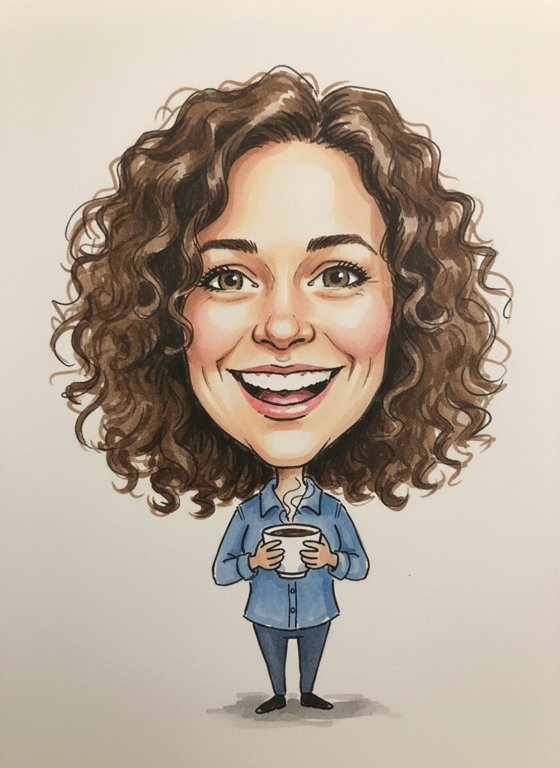 Example · AI-generated face
More examples
Tap one to see it bigger. Every photo is new, so yours will look different.
An AI caricature draws you the way a street artist would: a big head on a small body, your features gently exaggerated, and still clearly you.
You don’t need ChatGPT, a prompt or your chat history. Add one photo and get your caricature.
See the Caricature trendWhat is the AI caricature trend?
In early February 2026 a ChatGPT trend filled social feeds: people asked it to “create a caricature of me and my job based on everything you know about me”, often adding a photo, and posted the cartoon it drew, complete with props from their work. News anchors, doctors, teachers and personal trainers all joined in.
Because that prompt draws on everything ChatGPT remembers about you, privacy experts warned that the trend encourages people to hand over personal details.
Ours works differently. It uses only the photo you add, nothing else about you, and the photo is deleted from our servers as soon as your caricature is made. The drawing is a friendly street-artist sketch with a coffee cup in hand, rather than a scene about your job.
How to make it, step by step
What you get
- Marker and watercolour on plain off-white paper, like a quick sketch at a fair
- An oversized head on a small body, with a big smile
- Features gently exaggerated but still recognisably yours
- A coffee cup in your hand
- No text and no signature
- A portrait photo (3:4 JPEG) you can download and share
- Usually ready in under a minute
- 1 credit per photo; free results carry a visible watermark
Tips for the best result
- A smiling, front-facing photo gives the friendliest caricature.
- Clear features help the drawing look like you, so skip sunglasses and hats.
- Even light on your face works better than strong shadows.
- One person per photo.
Ideas for posting
- Use it as a profile picture.
- Send it as a birthday or farewell card.
- Post it next to the original photo and let friends spot what got exaggerated.
Questions
Do I need ChatGPT or my chat history?
No. It’s made from the one photo you add; we don’t use anything else about you.
Can it show my job?
Not yet. Every caricature has the same friendly style with a coffee cup; it doesn’t add props from your work.
Is it mean?
No. It’s a friendly caricature with gently exaggerated features and a big smile.
Is it really free?
New accounts get 10 free credits: a photo uses 1. Free results are watermarked. After that, credits come in plans and packs on the Pricing page.
What happens to my photo?
It’s stored privately and used only to make your photo. We delete it from our servers as soon as your photo is ready (or within 2 days if it isn’t made). The photo is kept for 7 days so you can download it. We don’t use your photos to train AI models.
Which photos are blocked?
Photos without a clear face, of anyone under 18 or of famous people, and photos with nudity or violence. A blocked photo uses no credits.
Sources
- Forbes, 6 February 2026: ChatGPT Trend Turns People Into Caricatures — And Shows How Well AI Knows Us
- Forbes, 9 February 2026: The New ChatGPT Caricature Trend Comes With A Privacy Warning
More guides
10 free credits · Add your photo, then sign in